On this page
What we do on our side
Every game here is built with a fixed set of performance constraints, because a zombie game with a hundred entities on screen is exactly the kind of thing that stutters if written carelessly.
- Object pooling. Zombies, bullets and particles are recycled rather than allocated, so a ten-minute run does not accumulate garbage-collection pauses.
- Capped backing store. The canvas renders at no more than twice CSS size regardless of screen density — a 3× phone display would otherwise cost 125% more pixels for no visible gain.
- Delta-time clamping. A long stall produces one clamped step rather than a catch-up spiral.
- Loop suspension. The render loop stops entirely when paused or when the tab is hidden, rather than running invisibly.
- Reduced particles when your system requests reduced motion.
Four things to check on yours
- Background tabs. Other tabs running video or animations compete for the same GPU. Closing them is the most effective single fix.
- Power mode. Battery-saver on phones and laptops throttles frame rates aggressively — often to 30 fps or lower.
- Hardware acceleration. If it is disabled in your browser settings, canvas rendering falls back to software and everything becomes noticeably slower.
- Page age. A tab left open for days accumulates memory pressure. A reload is free.
Fullscreen usually helps
Compositing the page around a canvas has a real cost — the browser is laying out and painting the header, the article text and the ad containers alongside your game.
Fullscreen removes all of that from the compositing path. On modest hardware the difference is often visible, and it is the first thing to try if a game feels heavy.
Which games are heaviest
- Zombie Swarm — the highest entity count on the site by a wide margin.
- Ultimate Zombie Arcade — the largest scene with the most simultaneous systems.
- Night Survivor — gradient lighting over the full canvas each frame.
All three are tuned to hold up on mid-range phones, but they are the ones to test if you suspect a hardware limit.
What we do not do
No third-party trackers, no analytics by default, no advertising scripts in the current build, and no external libraries. A game page loads a handful of small scripts from this domain and nothing else.
That is partly a privacy decision and partly a performance one — third-party scripts are the most common cause of jank on game sites, and the easiest to avoid by simply not adding them.
What a frame actually costs
Understanding roughly where the time goes makes the advice above less arbitrary.
At 60fps a frame has about 16.7 milliseconds. In a busy arena game that budget is spent roughly on: updating entity positions and collisions, drawing the background, drawing entities, drawing particles and UI, and then the browser compositing the result with the rest of the page.
- Entity updates scale with count and are usually cheap. Collision is the expensive part, which is why crowd separation is capped to nearby neighbours rather than every pair.
- Drawing scales with how much of the canvas changes. Full-canvas gradients — the lighting in Night Survivor — are the most expensive single operation in the library.
- Particles are capped by a fixed pool, so they cannot spike.
- Compositing is outside the game's control and is exactly what fullscreen removes.
Diagnosing a slow game
A short procedure that identifies the cause in a minute or two.
- Does it stutter from the first second, or degrade over time? Immediate means a capability problem; gradual means thermal throttling or memory pressure.
- Does fullscreen fix it? If yes, the cost was page compositing.
- Does it happen in every game or one? One game means that game's specific load; every game means a device or browser setting.
- Does a reload fix it temporarily? That points at memory pressure from a long-lived tab.
- Is battery saver on? The single most common cause of reported stutter, and it caps frame rate regardless of load.
How these games are kept fast
A short technical account, since it explains what will and will not help on your side.
- No frameworks or libraries. A game page loads a handful of small scripts from this domain and nothing else. No third-party code runs at all.
- Object pooling everywhere. Zombies, bullets, pickups and particles are recycled rather than allocated, so a ten-minute run does not accumulate garbage-collection pauses.
- Capped backing store. The canvas renders at no more than twice CSS size regardless of device pixel ratio. On a 3× phone display this cuts pixel work by more than half with no visible difference.
- Local collision only. Crowd separation compares each entity against a handful of neighbours rather than against every other entity, which keeps a 170-entity swarm linear rather than quadratic.
- Clamped delta time. A long stall produces one clamped step instead of a catch-up spiral, so recovering from a hitch never causes a second one.
- Loop suspension. Rendering stops completely when paused or backgrounded rather than running invisibly.
The practical implication is that if a game runs badly, it is almost always the device state — battery saver, background tabs, thermal throttling — rather than the page, because there is very little page to blame.
Testing your own device
If you want to know whether a problem is your device or the game, there is a quick sequence that isolates it without any tools.
- Play Zombie Dodge. It is the lightest game here — few entities, no gradients, a simple background. If this stutters, the problem is device state rather than game load.
- Then play Zombie Swarm. The highest entity count on the site. If Dodge is smooth and Swarm is not, you have found your device's entity ceiling.
- Then play Night Survivor. A full-canvas gradient every frame. If Swarm is smooth and this is not, the limit is fill rate rather than computation.
- Try each in fullscreen. If fullscreen fixes it, the cost was page compositing rather than the game.
That sequence distinguishes the three things that actually differ between devices: general throughput, entity handling, and pixel fill rate. It takes about three minutes and tells you which games to prefer on that device.
If all three stutter equally, the cause is almost certainly environmental — battery saver, background tabs, a long-lived page, or hardware acceleration disabled in browser settings. Those four account for the large majority of reports, and all four are quick to check.
Key takeaways
- Entities and particles are pooled, and the canvas backing store is capped at 2× CSS size.
- The render loop stops completely when paused or hidden.
- Background tabs and battery-saver mode are the two most common causes of stutter.
- Fullscreen removes page compositing cost and often helps visibly.
- No third-party scripts run on these pages, which removes the most common source of jank.
- Collision and full-canvas drawing dominate the frame budget; particles are pool-capped and cannot spike.
- Immediate stutter is a capability problem; gradual degradation is throttling or memory pressure.
- No third-party code runs on these pages, so performance problems are nearly always device state rather than the site.
- Three games in sequence isolate general throughput, entity handling and fill rate — about three minutes to diagnose any device.
Frequently asked questions
Why does the game stutter on my phone?
Do the games work offline?
Will these run on an old device?
Why is Night Survivor heavier than other games?

Alex Morgan
Gaming Editor & Arcade Content Specialist
Alex Morgan is the editorial byline for everything published on Zombie Games Hub — game design notes, strategy guides and the tuning decisions behind all 30 arcade titles. More about our editorial byline.
Published · Last updated
Games mentioned in this guide

Zombie Swarm
Dozens of small, fast infected and one repel pulse on a cooldown. Crowd control, not marksmanship.

Ultimate Zombie Arcade
Our flagship title. Three stages that each change the rules: clear the streets, hold the depot, reach extraction.

Zombie Highway
Four lanes of ruined highway, a fuel gauge and obstacles arriving faster than you would like.
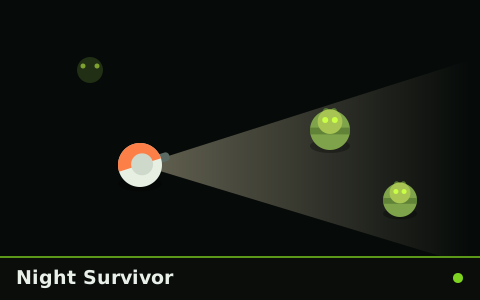
Night Survivor
A torch beam, a draining battery and everything outside the cone is a guess.